Lep's World
- 4.7
- Rating
- 100.00M
- Installs
- Free
- Price

 Analysis by App-foxy
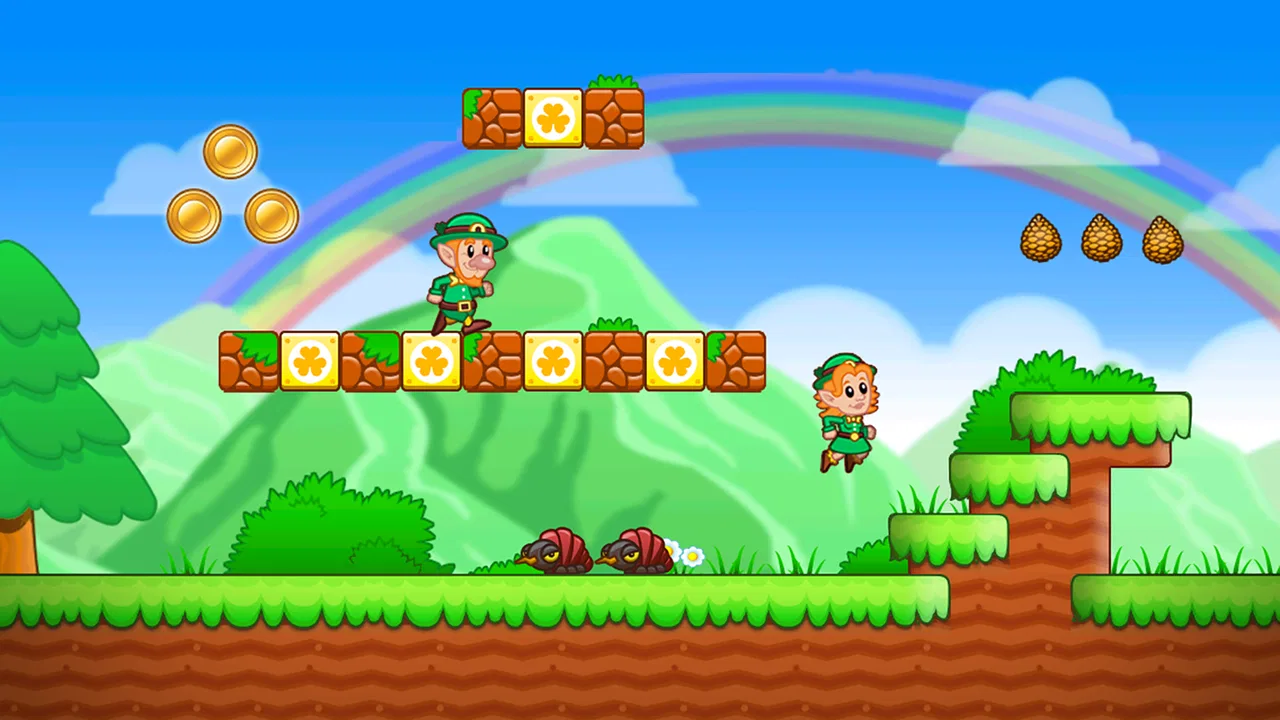
I picked up Lep's World expecting a simple platform game for short breaks, and that is still the best way to understand it. It is an arcade game from nerByte GmbH built around quick movement, jumping, collecting, and getting through colorful stages without turning the experience into a complicated project. I can start a level almost immediately, play for a few minutes, and put the phone down without needing to remember a large story or a long list of systems.
That simplicity makes it especially interesting on a shared household device. One person can hand the phone to a child, another can use it during a commute, and neither needs to learn a deep control scheme first. At the same time, the game is not so empty that adults have nothing to do. Its familiar platforming rhythm gives me a reason to replay sections, improve a run, and pay more attention to timing rather than simply tapping through.
How Lep's World works when the device is shared
In my experience, the strongest everyday use case is a short, informal session. Imagine waiting for an appointment while a child in the household wants a turn. The game is easier to pass between people than a strategy title because the objective is visible right away: move through the stage, avoid danger, collect useful items, and reach the end. I can explain the basic idea in a few words, then let the other player discover the rest through play.
You May Also Like

 Blood Strike: 2.5 Anniversary
Blood Strike’s Loadouts Turn Every Drop Into a Tactical Gamble
A close look at Blood Strike’s custom loadouts: how fast access to signature weapons reshapes its battle royale rhythm, rewards preparation, and narrows the gap between fights.

 Pandora - Music & Podcasts
Pandora’s Music Is Easy to Start, but Harder to Recover
Pandora’s strength is its low-effort path from a seed to a station. Its weak spot is how much confidence it asks you to place in connection, setup, and quiet recovery.

 8 Ball Pool
 Is Built on Rivalries, Rematches, and Routine
A close look at the rivalries, rematches, shared routines, and unanswered safety questions that turn a quick pool match into a persistent mobile community.

 Samsung Music
’s Quiet Strength Is Playing What You Already Own
Its reach comes less from spectacle than from dependable access to a personal library. That simplicity is both the app’s strongest retention engine and its ceiling.

 AccuWeather: Weather Radar
AccuWeather Review: A Quick, Clear Forecast for Everyday Decisions
For everyday plans, the best forecast is the one you can understand quickly. AccuWeather makes rain timing, radar, and local conditions easy to act on, with a few trade-offs.

 Hill Climb Racing
Why Hill Climb Racing Still Turns Crashes Into One More Run
A tiny car, a bumpy hill and one more upgrade: Hill Climb Racing keeps resurfacing because its simple chaos makes every near-miss feel personal.
More From Our News Desk
View All News


That convenience does not mean every session feels identical. A younger player may focus on reaching the next safe area, while an older player may care about collecting more items or repeating a difficult section with better timing. This gives the same game two useful levels of engagement. It can be a casual distraction, but it can also become a small skill challenge when someone wants to improve rather than merely finish.
The game belongs firmly to the arcade platformer tradition. Compared with endless runners, it feels more deliberate because the player has to read the space ahead and make controlled jumps. Compared with large adventure games, it is far less demanding: there is no need to manage a broad map, build a character, or remember a complicated plot. I would choose it over an endless runner when I want more control, but I would choose a richer platform adventure when exploration and story matter more than quick access.
What makes a good shared session
Passing the phone around works best when players agree on what counts as success. If one person wants to rush and another wants to search every corner, frustration can appear quickly. I found it more enjoyable to decide before starting whether the goal was simply to finish a stage or to make a careful attempt. That small agreement prevents a child from feeling pressured by an adult who is chasing a cleaner run.
There is also a practical advantage to the straightforward structure: the game does not require a long explanation every time somebody takes a turn. A player who has not touched it before can watch one attempt and understand the basic rhythm. That makes it suitable for a family waiting room or a quiet afternoon, although I would still keep the phone in the hands of the person whose turn it is rather than treating it like a simultaneous group activity.
One limitation is that the game is designed around individual control, not coordinated multiplayer. The household can coordinate turns and goals, but players are not working together inside the same stage. If your main reason for downloading a game is shared cooperation, this is the wrong type of experience. A dedicated multiplayer title will serve that purpose better.
Setup, boundaries, and the small details that matter
The initial barrier is low. It is free to download, has an Everyone content rating, and runs on Android versions beginning with 7.0. Those details make it a practical candidate for an older household phone rather than an app reserved for a newer device. The current version is 5.5.6.7, so I would still check that the phone has enough room and that its operating system can run it before planning a shared installation.
Because it is free, the important boundary is not the download price but the presence of in-app purchases ranging from $0.99 to $104.99 per item. I would not hand the device to a child without first agreeing who is allowed to make purchases. The safest household habit is simple: the person playing should not assume that an attractive option on screen is part of the free experience, and the account holder should make the final decision.
This is not a criticism of the core game itself; it is a reminder that a shared device mixes play and ownership. A child may see an optional purchase as a normal next step, while an adult sees it as a charge connected to the store account. I recommend explaining that difference before the first session. Even without inventing extra controls, a household can establish a clear rule: ask before spending, and never use another person’s account casually.
Another useful boundary is time. Platform games encourage “one more attempt,” especially after a missed jump near the end of a stage. On a personal phone, that may be harmless. On a shared device, it can interfere with another person’s turn or with practical tasks such as making a call. I found that a simple turn limit works better than trying to stop at an arbitrary emotional moment. Giving each player a stage or a short agreed session keeps the exchange friendly.
Accounts and responsibility on a common phone
I would treat the device owner’s account as the adult boundary, not as a communal wallet. The game can be shared as entertainment, but purchases should remain a separate conversation. This distinction is especially important when several people use the same phone and one player assumes that progress, settings, or store actions belong to everyone.
Before installing, I would also decide whether the game is for one regular player or for anyone in the household. That sounds minor, but it changes how people react to progress. If everyone expects to continue from the same place, a player who wants to replay an earlier section may affect the next person’s experience. If the household treats the game as a casual pass-and-play activity, there is less pressure to preserve one person’s route.
I would not present this as a substitute for formal family management. The useful protection comes from household habits: supervising younger players, keeping purchase decisions with the account holder, and agreeing on turns. Those habits are more reliable than assuming that a game’s Everyone rating automatically settles every question about maturity, spending, or screen time.
Coordinating turns without making the game feel like homework
The easiest coordination method is to use clear stopping points. A player can finish a stage, reach a natural pause, or hand over after a predetermined attempt. This is better than interrupting in the middle of a difficult sequence, where the next person may receive a confusing or unfair situation. It also makes the game feel less competitive when younger and older players have different levels of skill.
I like giving players different goals rather than ranking them. One person might try to complete the route safely, another might look for more collectibles, and a third might simply practice movement. That approach turns the game into a shared activity without pretending that everyone has the same ability. It also reveals one of the title’s quiet strengths: the basic platforming structure is flexible enough to support both relaxed play and deliberate improvement.
A helpful trick is to let a new player watch a full attempt before taking control. This gives them a visual sense of the pace and shows where the experienced player slows down. In a household setting, that is more useful than giving a long verbal explanation about buttons. Afterward, I would encourage the learner to repeat the same section rather than immediately taking on the hardest available challenge. Familiarity with the movement is more valuable than rushing ahead.
There is a trade-off here. A skilled adult may move through a level quickly, but that can make the game less enjoyable for a beginner who is still learning the timing. If the goal is shared enjoyment, the experienced player should resist taking over the phone to demonstrate every solution. Letting the newer player fail safely and try again creates a better learning experience than turning the session into a performance.
For adults using the game alone, the same idea becomes a personal routine. I can use a short session to practice one kind of movement or to improve a familiar section instead of treating every launch as a demand to finish a lot of content. That makes it a good fit for breaks when I want interaction rather than passive scrolling, but not enough time for a long console-style game.
Age, trust, and what the rating does and does not settle
The Everyone rating matches the approachable presentation and straightforward arcade format. I would feel comfortable considering it for a broad household audience, especially compared with games built around frightening themes, realistic violence, or mature dialogue. Still, an age label does not tell me whether a particular child will become frustrated by repeated mistakes or whether the child understands purchase boundaries.
For younger players, the main question is not whether they can understand the objective. Most can grasp that quickly. The more important question is whether they can accept that a missed jump may require another attempt. I would introduce it as a game of practice rather than a test of ability. That framing helps prevent a simple arcade challenge from becoming a source of unnecessary arguments.
Trust also matters when the device belongs to somebody else. I would explain which actions are part of normal play and which actions require permission. A child should know that asking before spending is not a punishment; it is simply how a shared account works. Older children may be able to manage their own turns, but I would still keep the same rule for purchases because the financial responsibility belongs to the account holder.
The game is less suitable for a household looking for educational structure, creative building, or a strong cooperative objective. It can support patience, observation, and timing, but I would not confuse those incidental benefits with a formal learning tool. If the family wants a game that teaches a subject, encourages open-ended creation, or lets several people act together, another category will be a better match.
Adults should also consider whether they enjoy repetition. The appeal comes from movement and improvement, not from a constantly changing set of activities. I found that satisfying when I wanted a familiar challenge, but someone who needs a new mechanic every few minutes may lose interest. That is one of the clearest reasons to skip it: the classic formula is its identity, and it will not suit players who find that formula too traditional.
How it compares with the usual arcade alternatives
Against endless runners, this game gives me more opportunity to make intentional decisions. An endless runner is excellent when I want a fast reflex test with almost no commitment to a particular stage. Lep's World feels better when I want to understand a route, adjust my timing, and try again with a specific improvement in mind. The cost of that control is a little more attention; it is not as effortless as watching the screen and reacting to a constantly advancing track.
Against large platform adventures, it is much easier to share informally. A complex adventure may offer deeper worlds, richer progression, and more variety, but it also asks players to remember systems and invest longer sessions. This title is more convenient for an older phone, a short break, or a child who is still learning the basic language of platform games. The trade-off is that it does not replace a substantial adventure for someone seeking exploration, narrative, or a large sense of discovery.
It also differs from competitive multiplayer games in a useful way. There is less social pressure because players can take turns rather than compare themselves in real time. That makes it calmer for mixed-age households. However, there is no built-in shared objective for several players to solve together, so families wanting teamwork should look elsewhere.
The scale of its audience is notable: it has passed 100 million installs, with a 4.7 average from around 1.3 million ratings and roughly 25 thousand written reviews. Those figures do not guarantee that every player will enjoy the same style, but they do show that the straightforward approach has reached a very large audience. I see that as reassurance that the controls and general concept are easy to understand, not as proof that it offers the depth of a premium console platformer.
Who should install it, and who should pass
I would recommend it to someone who wants a free arcade game that can be learned quickly, works well in short sessions, and remains understandable when a phone moves between household members. It is particularly appealing if you enjoy classic left-to-right platforming, prefer active play to passive entertainment, and do not mind repeating a section to improve your timing.
I would be more cautious about recommending it to a player who dislikes retries, wants online cooperation, or expects a large story. I would also skip it as a shared-device choice if the household cannot agree on purchase rules. The free entry point is convenient, but the range of optional item prices means the account holder should remain involved in spending decisions.
For a child, I would introduce it with three simple expectations: ask before any purchase, stop at the agreed turn boundary, and treat failure as part of the game. For an adult, I would suggest using it as a focused break rather than promising a deep long-term hobby. Those expectations line up with what the game does well and avoid asking it to be something it is not.
A practical household verdict
After spending time with it, I see Lep's World as a dependable shared-device arcade game rather than a complete family gaming platform. Its value comes from accessibility: the objective is easy to grasp, the format suits short sessions, and different ages can approach the same stages at their own pace. The developer, nerByte GmbH, has kept the experience recognizable enough for a quick handoff while leaving room for players who enjoy practicing their movement.
The household experience depends less on complicated setup than on sensible boundaries. Decide who controls purchases, agree on turns, and avoid treating the Everyone rating as a replacement for supervision. Those steps address the real friction points: account responsibility, uneven skill, and the temptation to keep attempting a difficult section after someone else is waiting.
My final recommendation is positive, with a clear condition: install it when you want approachable platforming and a game that can move comfortably between casual players. The free price and broad age rating make it easy to try, while the familiar arcade design keeps the first session uncomplicated. Just remember that its strengths are simplicity, quick access, and repeatable skill-based play—not cooperative multiplayer, educational structure, or a large narrative world.
For my own household scenario, I would keep it available for waiting rooms, short breaks, and informal turn-taking, while choosing another game for a planned group session. That is where it fits best. Lep's World is a good choice when the goal is to share a small platforming challenge, not to make one game handle every kind of family entertainment.
FAQs for Lep's World
01What is Lep's World about?
Lep's World is a platformer game inspired by classic arcade titles. Players guide Lep, a leprechaun, through various levels filled with obstacles, enemies, and treasures. The objective is to collect coins and power-ups while avoiding dangers, making it a fun and challenging game for fans of the genre.
02Is Lep’s World free to play?
Yes, Lep's World is free to download and play on both Android and iOS devices. However, the game includes optional in-app purchases for players who wish to enhance their gaming experience with additional features or items. These purchases are not necessary to enjoy the full game.
03What are the main features of Lep’s World?
Lep's World features over 160 levels, each with unique challenges and environments. The game offers smooth graphics, intuitive controls, and engaging soundtracks. Players can also compete with friends through leaderboards. The variety of levels and consistent updates keep the gameplay fresh and exciting.
04Can Lep’s World be played offline?
Yes, Lep’s World can be played offline, making it a great option for gaming on the go without the need for a stable internet connection. However, some features, such as leaderboard updates or in-app purchases, will require an internet connection to function properly.
05Are there age restrictions for Lep’s World?
Lep’s World is suitable for all ages, with its colorful graphics and simple gameplay mechanics. However, parents might want to be aware of in-app purchases and ensure that any purchases are protected by device settings to prevent accidental transactions by younger players.
Pros
- Engaging platformer with vibrant graphics.
- Simple controls make it easy to play.
- Numerous levels offering diverse challenges.
- Offline play available for on-the-go gaming.
- Frequent updates with new features.
Cons
- Contains ads that can interrupt gameplay.
- In-app purchases can be pricey.
- Some levels may feel repetitive.
- Limited character customization options.
- Occasional performance lags on older devices.

Lep's World
Gallery